
Slack app
boxes.dev for Slack
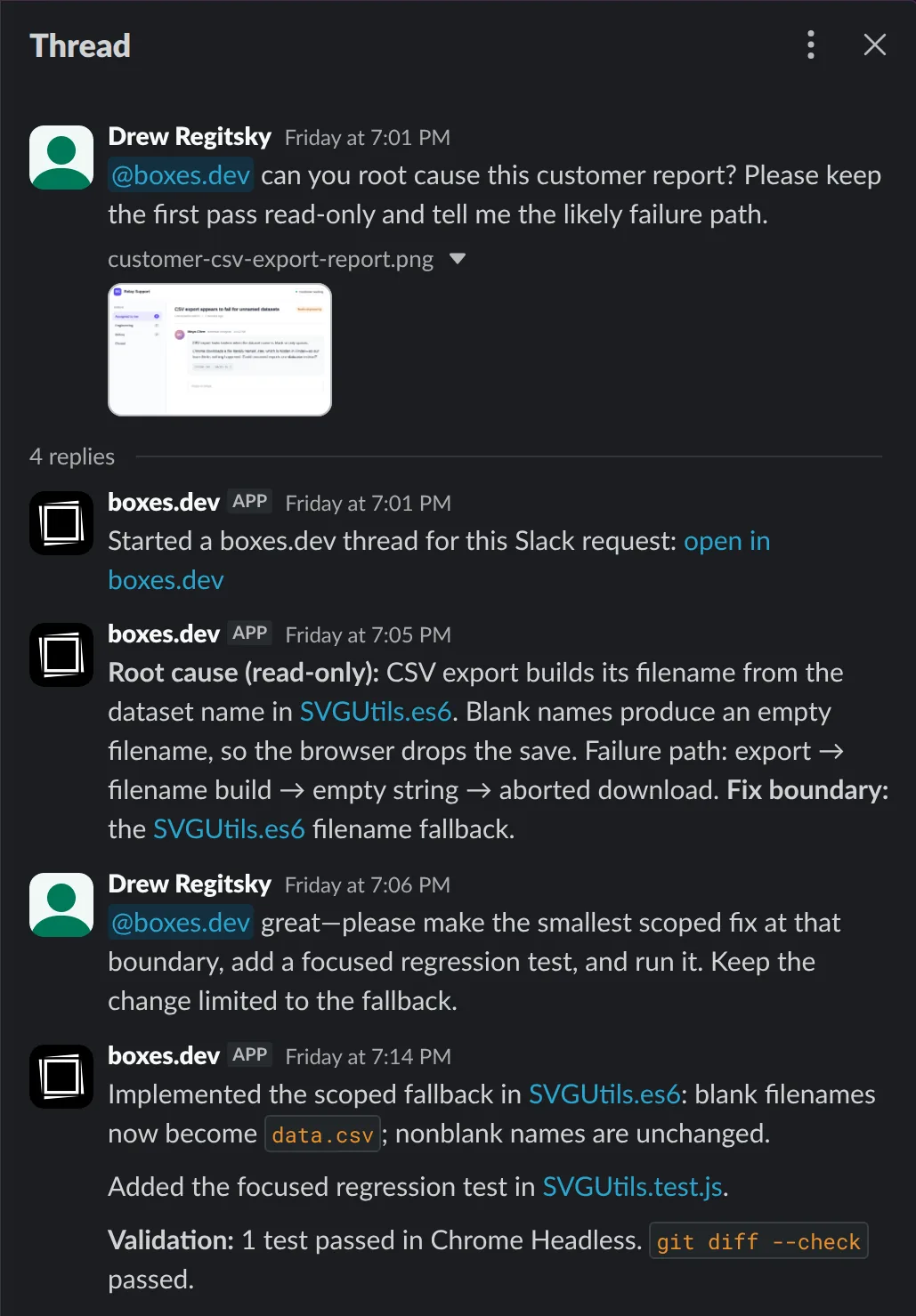
Start Claude Code or Codex from a Slack thread. boxes.dev runs each request on its own cloud devbox with your project's environment, posts progress back to the thread, and keeps follow-ups in the same agent conversation.
You'll need permission to install apps in your Slack workspace, or a Slack admin who can approve the install. If you don't have a boxes.dev account yet, you can create one after you approve boxes.dev in Slack.
What you can do
- Start an agent from a thread. Mention
@boxes.devwith a request. The agent receives your saved prompt, your request, and the messages in that Slack thread. - Follow up in Slack. Mention
@boxes.devagain in the same thread to send another instruction to the same agent conversation. - Get results where you asked. boxes.dev posts a start message with a link to the agent's thread, and replies in Slack when the run ends.
- Preview shared threads. When someone posts a thread's share link, boxes.dev adds a preview with the thread's title, status, and the agent's latest reply, and updates it as the agent works. Everyone who can see the message sees the same preview.
Set it up
- Click Add to Slack and approve boxes.dev for your workspace.
- Sign in to boxes.dev, or create an account, and connect the workspace to your team. Only a boxes.dev team admin can connect it.
- If you're new to boxes.dev, get the desktop app and set up a project.
- Link your Slack account in boxes.dev, then turn on Slack requests for a project in the boxes.dev desktop app.
- Add
@boxes.devto a channel and mention it with a task.
The setup guide walks through each step with screenshots.
What boxes.dev can see in Slack
boxes.dev reads a Slack thread when someone mentions @boxes.dev in it or sends the app a direct message. It reads files attached to those messages, and profile details such as names and email addresses so it can match Slack users to their boxes.dev accounts. When someone posts a boxes.dev link, the app receives that link and where it was posted, so it can add a preview.
The coding agent you choose receives that Slack content, so it is processed by that agent's AI provider. boxes.dev does not use Slack data to train AI models. The privacy policy explains what boxes.dev stores and how to have it deleted.
Coding agents can make mistakes. Review an agent's responses and changes before you rely on them.
Limits
- Each boxes.dev team connects one Slack workspace.
- The app works in channels it has been added to and in direct messages. It doesn't respond in group direct messages or to people outside your workspace in Slack Connect conversations.
- Agent runs use your boxes.dev plan and your own Claude or Codex account.
Support
Email hi@boxes.dev or visit support.